
window[ elementId or elementName]
TOC
Background
Automatically registering a global variable for every DOM element that has an id is a feature browsers have supported for a very long time.
The reason this legacy behavior is still supported is that many long-standing sites depend on that automatic registration.
I'd rather you didn't use these automatically registered globals.
How window[elementId or name] works
This is a special feature the browser environment provides.
- While parsing the HTML, it finds elements that have an id.
- As the DOM is built, it registers the element with that id in the global scope (window).
- From then on, accessing window[‘elementId’] returns the registered DOM element.
Conditions for access
An id works on nearly every element.
Even when a DOM node has a name attribute, only certain elements (<iframe>, <embed>, <object>, <img>, <form>) get registered globally.
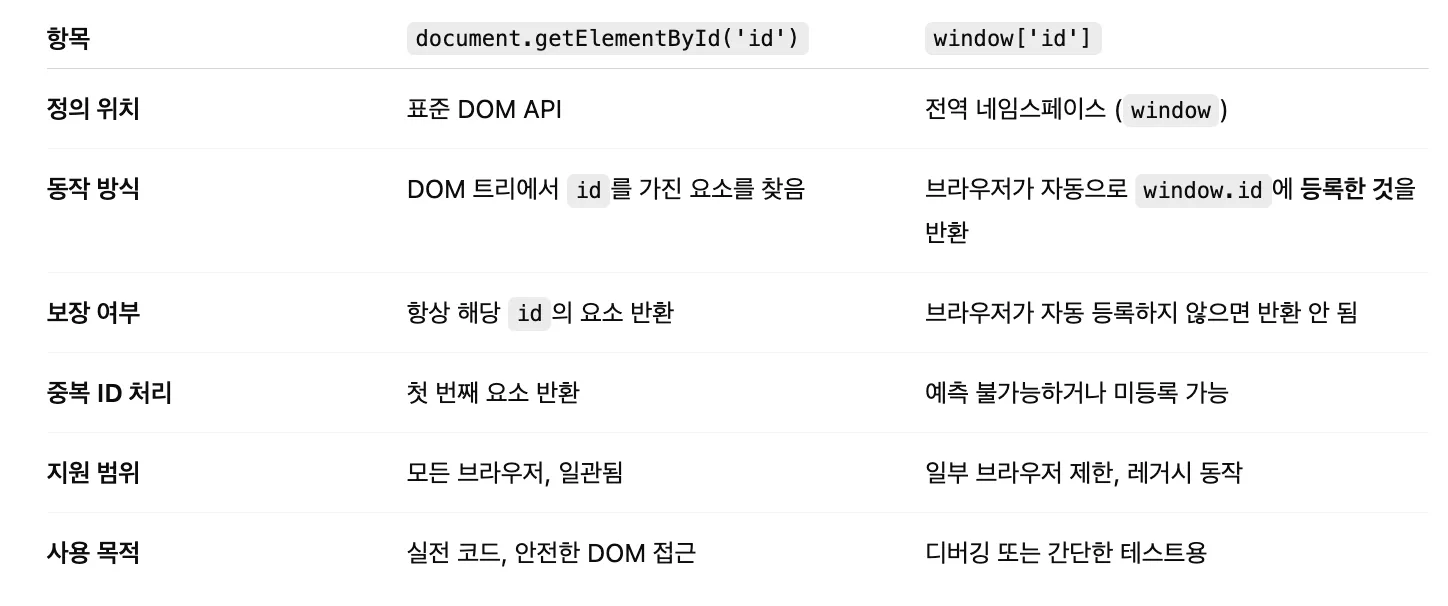
The difference between window[elementId or name] & document.getElementById(‘elementId’)
The results look the same, but the mechanism differs ( how the element is found and returned )
// example Dom
   <div id="div1">5</div>
   <div id="div1">1</div>
   <div id="div1">2</div>
   <div id="div1">3</div>
   <div id="div1">4</div>

// passing an element that has an id, like this
window['div1'] // returns all of the DOM nodes above
document.getElementById('div2') // returns the first element, <div id="div1">5</div>

// passing an element that has no id, like this
window['div2'] // undefined (no such global variable)
document.getElementById('div2') // null (no DOM node with that ID)
Conclusion
I think window[elementId or name] is best used for debugging in devtools.
Reference
https://html.spec.whatwg.org/multipage/nav-history-apis.html#named-access-on-the-window-object